Category: Collaboration
-
/
Iotum improves their Facebook conference call app…
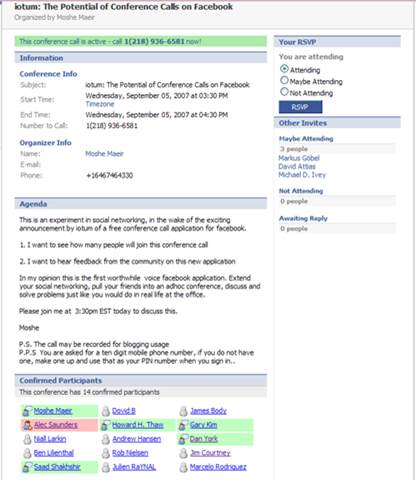
Continue Reading: Iotum improves their Facebook conference call app…What a difference a day makes. When I wrote about Iotum’s “Free Conference Call” app for Facebook yesterday, I mentioned that there were a few things still in development. Today, as shown in the image on the right (click on it for larger image), they’ve already addressed two of the issues: 1) the Agenda can now be completed (and in fact is the second step now while you are setting up the call); and 2) they’ve corrected the display issues with the participants. With a few participants, the pictures loaded in very quickly, and with a larger number of participants the pictures were removed and only the names were shown. Kudos to the Iotum team for iterating so quickly.
FYI, as shown in the image, I did participate in the “historic” public conference call hosted today by Moshe Maeir at 3:30 Eastern US time today. It was a good demonstration as at one point we had easily 10+ people involved. Very nice to see who joined simply by looking at the list of participants and seeing who was in green. (Hmmm… note to Alec, you might want to rethink the use of green and red as there is some percentage of…
-
/
Facebook gets free conference calls with Facebook app from Iotum
Continue Reading: Facebook gets free conference calls with Facebook app from IotumConference calls – inside of Facebook? And for free?
Yes… courtesy of the folks up at Ottawa-based startup Iotum. As I’ve written before, there are tons of applications being developed for Facebook, but there haven’t been a whole lot of voice applications and there have been even fewer (in fact, almost none) voice-over-IP (VoIP) applications. Of the existing voice apps (nicely listed by Pat Phelan), most of them are really what I’ll call “consumer” apps… primarily focused on cheaper phone calls or making it easier to call people. Or “calling” other Facebook users – or leaving them voicemail. But there haven’t really yet been any interesting apps I’ve seen that could provide business features.
Until now. The team at Iotum just released their “Free Conference Call” Facebook application and now allowed anyone to install it. Until now, it’s been in a very limited test phase, but after Alec issued his request for volunteers last Friday, I naturally had to give it a try (and he asked us not to write about it until today).
So here’s the process. After you’ve installed the app, you have to go through a brief authentication process to put your mobile phone number on file with…
-
/
IBM announces acquisition of WebDialogs, makers of Unyte!
Continue Reading: IBM announces acquisition of WebDialogs, makers of Unyte!Wow! From the stage here at VoiceCon, Michael Rhodin, General Manager of Lotus Software at IBM just announced that they are acquiring WebDialogs, the makers of Unyte!
IBM just issued a news release announcing this acquisition.
For those of us following the Skype space, Unyte has been known for a long-time as one of the leading business/collaboration extras available for Skype.
Congrats to the WebDialogics folks and it will be VERY interesting to see where this goes!
Technorati tags: ibm, webdialogs, unyte, collaboration, web conferencing, skype, voicecon -
/
New version of IM+ out that lets you do Skype from your Blackberry…
Continue Reading: New version of IM+ out that lets you do Skype from your Blackberry…About a month ago, I wrote about the “IM+ for Skype” client that let you use Skype on your Blackberry. Well, a new version 2.5 is out now and Jim Courtney over at Skype Journal has a review. Jim is quite enthusiastic about a new feature that lets you specify the number at which IM+ will call you back (rather than only calling you back on your mobile). I also found this interesting:
As an added benefit, IM+ 2.5 will not only make calls to those in my Skype Contacts but also my Blackberry address book. In summary IM+ provides a very versatile way of combining access to both Skype and Blackberry resources.
Interesting to see the merger of Skype and Blackberry directories. I’ve not yet played with it and don’t see myself having the time to do so in the next bit, but Jim says he’ll be writing more in the time ahead about it.
Technorati tags: skype, blackberry, rim, im+, im, shape services, jim courtney, skype journal -
/
iSkoot – cool idea for a Skype client for Blackberry, but I don’t see me using it much because…
Continue Reading: iSkoot – cool idea for a Skype client for Blackberry, but I don’t see me using it much because…Last week I wrote some first impressions of iSkoot, a new Skype client for Blackberry, and while I still think it’s a very cool idea, I don’t see myself using it all that much. Why not? Very simply…
Battery life!
Or the lack thereof. Yes, indeed, it all does seem to come down to batteries, and iSkoot seems to certainly consume its share of power. Now granted, my Blackberry 7290 is an older model and for all I know could probably use a new battery, but in “normal” operation, I can charge it up and then have it run for a good 3 or 4 days before it needs a recharge. However, start up iSkoot and I found I suddenly needed a recharge by the end of the day!
In fairness, iSkoot is not alone in this… the other Blackberry IM clients I’ve used, both the Windows Messenger client and also most recently the IM+ client for Skype also have this same problem. I’m assuming it has something to do with the need to regularly use the data connection for updates to status and to update chat messages.
I can see this actually being most useful to me when I’m traveling and…
-
/
iSkoot provides another Skype client for Blackberry devices… review – and my first reaction is that it has a challenge with the "instant" part of "instant messaging"
Continue Reading: iSkoot provides another Skype client for Blackberry devices… review – and my first reaction is that it has a challenge with the "instant" part of "instant messaging"NOTE: Please see the updates at the bottom of this post.
Back on Monday, Jim Courtney over at Skype Journal IM’d me (on Skype naturally) asking if he could do a test call to me on "another Skype client for the Blackberry". Naturally, I said yes and in a moment or so we were speaking. It turned out that he was using a new beta application from iSkoot. From the news release:
The new iSkoot v1.1 delivers a comprehensive mobile Skype experience on BlackBerry: With the click of a button, users can instantly chat with their Skype contacts, make and receive Skype calls, and use SkypeOut™ to inexpensively call regular phone numbers nearly anywhere in the world. iSkoot v1.1 also displays complete Skype contact status information, so BlackBerry users can see which friends, family members and business colleagues are available, as well as manage their own online presence. This latest release features a next generation, easy-to-use interface especially designed for BlackBerry users and will offer additional features soon. iSkoot works without any need for PCs, special hardware, custom phones or Wi-Fi hot spots, and utilizes the existing mobile network infrastructure to route Skype calls through the voice channel.
It…
-
/
Google acquires GrandCentral… and enters further into the PSTN side of telecommunications
Continue Reading: Google acquires GrandCentral… and enters further into the PSTN side of telecommunicationsNews breaking out today is that Google has acquired GrandCentral for something around $50 million. GrandCentral is a service that gives you one phone number that can ring multiple numbers, provide one common voicemail – and all sorts of the other features (see “howitworks” for a list of features). As the GrandCentral blog entry says:
We started GrandCentral because we wanted to create a service that puts users in control of their voice communications and not the other way around. As you have discovered, with GrandCentral you get all of your phone calls through just one number that never changes and you can link and ring up to six phones to ring when somebody calls you. But that’s just the start. You can set different rules for each caller (some ring all your phones, other can go straight to voicemail), create personal voicemail greetings for each of your callers, and even check your voicemail on the web with all of your messages in just one inbox. We’ll even save your messages for as long as you want.
I first learned of GrandCentral quite some time ago from Andy’s blog and subsequently heard GrandCentral CEO Craig Walker talk out…
-
/
Microsoft: When simply having an IM conversation becomes a tool to raise money for nonprofits… is this for real?
Continue Reading: Microsoft: When simply having an IM conversation becomes a tool to raise money for nonprofits… is this for real?We’ve all undoubtedly seen the chain-letter email messages that circulate around telling you that by forwarding the email you will make money or receive gifts and most people with half a clue understand that this kind of thing is pretty much impossible. So it was with a whole lot of skepticism that I first greeted Microsoft’s “i’m” campaign because the premise is: for every IM conversation you have with Windows Live Messenger, we’ll donate some money to the nonprofit of your choice (from among nine choices). To me, it sounded just a wee bit fishy. In reading the “About” page you do learn a bit more. First:
Every time you start a conversation using i’m, Microsoft shares a portion of the program’s advertising revenue with some of the world’s most effective organizations dedicated to social causes. We’ve set no cap on the amount we’ll donate to each organization. The sky’s the limit. There’s no charge, so join now and put our money where your mouth is.
and then this:
Once you’ve signed up, every ad you see in your message window contributes to the grand total we send to the causes.
So it’s all about a portion of…