
Category: Messaging
-
/
WhatsApp and End-to-End Encryption (a ChatGPT3 article experiment)
Continue Reading: WhatsApp and End-to-End Encryption (a ChatGPT3 article experiment)For those who use WhatsApp, you may have noticed that your messages are secure and private, thanks to the encryption that is used. But what is encryption, and why is it so important?
Encryption is a process of scrambling information so that only the intended recipient can read it. Essentially, it takes the data you’re sending and scrambles it using a mathematical algorithm. To unscramble the data, you need a key, which is known only to the sender and the receiver.
WhatsApp uses end-to-end encryption, which means that your messages are encrypted on the sender’s device, travel securely to the receiver’s device, and remain encrypted until the receiver reads them. This means that no one – not even WhatsApp themselves – can see the messages you’re sending.
This is an important feature for anyone concerned about their privacy, especially in an era of increased surveillance. With WhatsApp’s encryption, you can be sure that your messages will stay safe, secure, and private.
WhatsApp is also working to improve their encryption, with plans to add a feature known as “Perfect Forward Secrecy”. This feature will generate a new encryption key for each message you send, ensuring that if one key is ever…
-
/
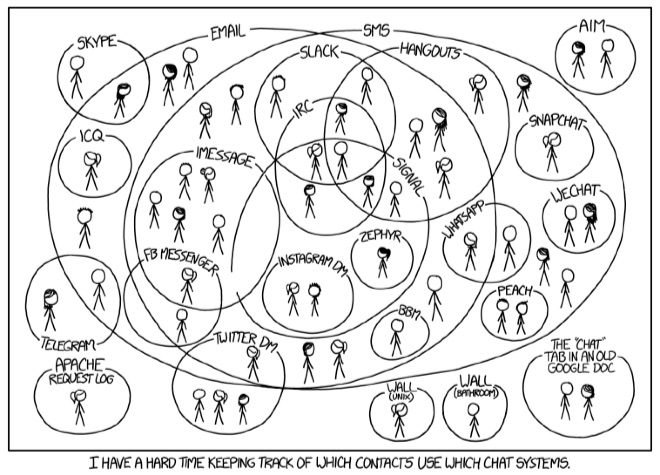
XKCD Comic Perfectly Captures Sad, Fragmented State of Messaging / Chat Systems
Continue Reading: XKCD Comic Perfectly Captures Sad, Fragmented State of Messaging / Chat SystemsIn one picture, this comic from xkcd nails the very sad state of fragmentation with our messaging systems today. The text says:
I have a hard time keeping track of which contacts use which chat systems.
And that is our major pain point today.
Think about it… do you know how to reach most of the people you need to communicate with?
Some readers may have just decided that they are going to ONLY use one service. They communicate on only, say, Facebook. Or WhatsApp. (Or in one case I know, someone has rejected all new messaging apps and will only communicate with email.)
And so if you want to communicate with them you have to use their one service.
But of course, if you want to communicate with other people, you have to use their service… which leads to this comic and the mental energy we all must expend to remember (names are made up):
- George likes to get Twitter DMs
- Sue and Jose only use Facebook Messenger
- Carlos only uses WhatsApp
- Heidi, Frederick and Laura only use Wire
- Your parents all use iMessage… except when they decide to use Facebook Messenger
- Your teenage kids…
- George likes to get Twitter DMs
-
/
Facebook Messenger’s “Instant Video” Lets You Simultaneously Use Video and Chat
Continue Reading: Facebook Messenger’s “Instant Video” Lets You Simultaneously Use Video and ChatThe messaging wars continue! Today Facebook Messenger added “Instant Video” to it’s iOS and Android app, allowing you to easily share live video while still in a text chat. Facebook has had “video calling” since back in May 2015, but that requires both parties to answer the video call in the same way that Facetime, Wire and every other video app does it.
“Instant Video” is different:
VIDEO STARTS OUT ONE-WAY – Only the video of the person initiating “Instant Video” is shown. The recipient sees the video of the sender, but their video connection is NOT enabled. Now, the recipient can start sending video, but they don’t have to.
AUDIO IS OFF INITIALLY – When the sender starts their video, the recipient receives the video without any sound. They can easily start getting sound by tapping on the speaker icon on the video, but this is great because often you are having a text conversation precisely because you don’t want to use audio.
YOU CAN STILL SEE THE CHAT – The video overlays the upper right corner of the chat window, but that’s it. You can still see the chat messages and continue having your chat.
This last point…
-
/
Facebook Messenger Launches Group Conference Calls (Audio-only)
Continue Reading: Facebook Messenger Launches Group Conference Calls (Audio-only)Continuing their efforts to be THE communication platform you use, the Messenger team at Facebook rolled out “group calling” this week within the Messenger app on iOS and Android. The new feature was announced by David Marcus, head of the FB Messenger team. Right now this is audio-only (i.e. not group video) and per media reports is limited to 50 participants.
I had to go to the AppStore and upgrade the Messenger app on my iPhone to the latest version, but once I did, I suddenly had a phone icon in the upper right corner of a group chat:
Tapping that phone icon brought me to a screen where I could choose which of the group members I wanted to bring into the group call:
After tapping “Call” in the lower right, Messenger launched the call and gave me feedback about who it was connecting, etc:
It then connected those who were available and four of us were in a group conference call:
As you can see in the screen captures, I had the standard buttons to mute my microphone and to activate the speakerphone.
AUDIO QUALITY – The audio quality was quite good. I couldn’t find any technical info…