Month: September 2007
-
/
Oops… challenges of using a new blog editor – I turned Trackbacks OFF by default
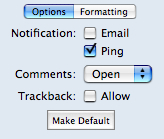
Continue Reading: Oops… challenges of using a new blog editor – I turned Trackbacks OFF by defaultAs I finished up my last post with additional thoughts on Skype and hotel networks, I naturally went to look for the TrackBack URI on my first post so that I could have the link show at the bottom of the article. However, when I went to look – there was no TrackBack URI shown! I went into TypePad’s control panel and, sure enough, the checkbox for allowing TrackBacks was unchecked. In further investigation, I found it was unchecked for all my other recent posts! (Now, fixed… they all should accept TrackBacks.)
The reason was relatively easy to find. When I started using my new MacBook Pro about two weeks ago, I started using a new offline blog editor, ecto. Over in the options area, there is a checkbox for TrackBack’s that I apparently had left in the unchecked state. I have now checked it and clicked the “Make Default” button so that it remains in this state. Details, details, details… (and my apologies to anyone who was looking for the trackback URI).
P.S. If any of you are Mac users and have opinions on what is the best offline blog editor to use on a Mac, I’m…
-
/
Additional thoughts on Skype and hotel networks – there’s issues on both sides…
Continue Reading: Additional thoughts on Skype and hotel networks – there’s issues on both sides…To my immense surprise, my article yesterday about my challenges with Skype and my hotel Internet connection just hit TechMeme today, so welcome, anyone who is coming my way from there. But that also prompted me to want to offer up some additional thoughts on the subject.
First, I’m actually quite annoyed at the Best Western here in Ontario, CA, for essentially blocking Skype by virtue of their network security traffic policies. If travel shall bring me to Ontario, CA, again, you can be pretty sure that I will not be staying here. Skype has become an important communication tool for me and <cue violins>was the way I was intending to call home and stay in touch with my family</violins>. Skype has worked great at the hotel I was at earlier in the week in Phoenix and in fact at every other hotel I’ve been at lately. I do intend to contact Best Western to express my dissatisfaction at being unable to use the program.
Having said that, as a security professional I do understand WHY the security team at the Internet provider to this Best Western hotel has the policies in place that they do. As Phil Wolff commented,…
-
/
How using Skype disrupted my hotel Internet connection and locked me out
Continue Reading: How using Skype disrupted my hotel Internet connection and locked me outUPDATE: I have now posted some additional thoughts about this issue.
It’s been a frustrating time here at the hotel in Ontario, CA, where all I’ve been trying to do is use the Internet connection. I’m staying at the Best Western and did so largely because they advertised free high-speed Internet (they were also cheaper than others). First annoyance was discovering that I was too far away from their APs to use wireless, but since I had an ethernet cable I just plugged into the wall jack and expected to get access. The very first time I connected, I did get an IP address and could see an entry in my routing table for the default gateway. However, I couldn’t ping it.
Being rather used to network troubleshooting, I did the usual things… bringing the interface up and down, disconnecting and re-connecting the cable. I even went to the hotel lobby and got a new cable in case the issue was with my portable/retractable cable.
Nothing. No net.
In desperation I did the thing that tech support always tells you to do but I avoid… reboot. Nothing.
So finally this morning I got on the phone to the Best Western…
-
/
My MacBook seems to be stuck in “Borg emulation mode” (red light) with no access to the built-in speakers
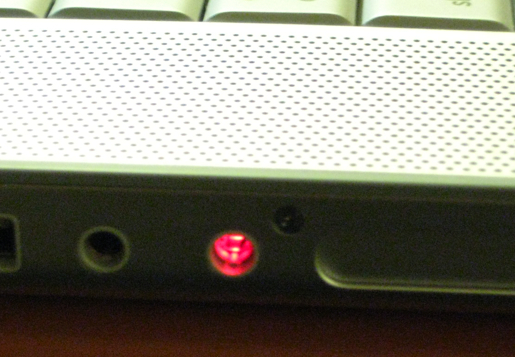
Continue Reading: My MacBook seems to be stuck in “Borg emulation mode” (red light) with no access to the built-in speakersSo it seems I’ve done something to mightily mess up my new MacBook Pro. The other night while in my hotel room at AstriCon, I was using my headset for some Skype calls and then had it in when I started to play some music. Wanting to listen on the built-in speakers, I just pulled the headset out and was then surprised to hear no audio. If I plugged the headset back in, I could hear audio fine. Remove it, no audio. It was about then that I noticed the red light coming out of the side of the MacBook Pro. I didn’t know what this was and tried several other things before finally just forgetting about it.
The next day at AstriCon, I was on the IRC backchannel when someone else in the same physical room as I was figured out who I was and then asked why my MacBook had a red light coming out of the side. In further discussions with others on the channel, it turns out that Apple has done something that on one level is rather cool. They’ve overloaded the functionality of the headphone jack so that it is both a regular…
-
/
Digium buys SwitchVox and gets presence, Web 2.0 interface, mashups to Google Maps, Salesforce.com, SugarCRM…
Continue Reading: Digium buys SwitchVox and gets presence, Web 2.0 interface, mashups to Google Maps, Salesforce.com, SugarCRM…Imagine you are a customer service rep (CSR) at a small/medium company and a phone call comes in from a customer. As your phone rings, up on your screen pops all the information about that customer, pulled from your CRM database in Salesforce.com or SugarCRM, plus other information from other databases and finally a nice Google Map showing you where that customer is located and potentially other information like the locations of your nearest offices. During the call, the CSR needs to bring in a subject matter expert so the CSR consults their web panel and looks at the presence information displayed for each of the other people in the business. The CSR can then contact someone showing as available and potentially bring them into the call.
Now imagine that all that is running on top of open source telephony… specifically Asterisk.
You can now stop imagining, because Digium just bought the company that does precisely that. There will undoubtedly be much attention today (at the very least in the VoIP blogosphere) about Digium’s announcement here at AstriCon today that they have acquired SwitchVox. I am going to bet that much of the reporting today will focus on angles…
-
/
Zoiper – a free SIP / IAX softphone for Windows, Linux or Mac
Continue Reading: Zoiper – a free SIP / IAX softphone for Windows, Linux or MacIn watching Jay Phillips do his great presentation here today at AstriCon about Ruby and his Adhearsion package, I found myself wondering what the interesting little softphone was that he was using. It turned out to be “Zoiper“, an IAX or SIP softphone that was previously called “Idefisk”. (I can understand perhaps why they changed the name… “Idefisk” does not exactly roll off your tongue.) There turn out to be two versions (comparison chart here): a free version and a “Zoiper Biz” version which includes more functionality and starts around 30 euros.
Clearly built for Asterisk, it was interesting to note that it supports both SIP and also Asterisk’s own IAX protocol. Anyway, I just thought I’d share that this softphone is out there if you were not aware of it.
-
/
Astricon… way too much to write about…
Continue Reading: Astricon… way too much to write about…Great sessions out here at AstriCon… way too much to write about – my head is exploding a good bit! It’s been a bit frustrating to try to blog from the conference rooms, though. The hotel WiFi is struggling a good bit under the strain of all the people here with laptops.
-
/
AstriCon kicks off with “Developer 101” and “Asterisk 101” pre-conference sessions
Continue Reading: AstriCon kicks off with “Developer 101” and “Asterisk 101” pre-conference sessionsHere in Phoenix, Arizona, AstriCon has kicked off with two pre-conference sessions that run all day. “Asterisk 101” is running next door and providing a basic introduction to Asterisk. I’m sitting in the “Developer 101” session (pictured) where there are about 100 people gathered in the room. It turns out that this is about developing with the Asterisk code base, i.e. “how to become an Asterisk developer” versus what I was personally thinking it was, which was “how to develop apps that work with Asterisk”… although that is really just an extension of the first. So far, an hour into the session, lead developer Kevin Fleming has been discussing the various tools you need to use in order to work with the Asterisk code base (ex. subversion, makefiles, etc.). Right now he’s been dealing with the fun subject of licensing code, the GPL, and the requirement of developers to sign a disclaimer over to Digium that: a) asserts that the developer can contribute the code (i.e. it is original), that it is not patent-encumbered, etc. and b) gives Digium the right to redistribute the developer’s code under a different license.
One interesting note – Kevin stated very definitively that Digium…
-
/
Digium launches their “Inside the Asterisk” group weblog
Continue Reading: Digium launches their “Inside the Asterisk” group weblogEarlier this month, the folks at Digium rolled out their own group weblog, “Inside the Asterisk“, which gives a view of activities inside Digium. A true group weblog, there are posts from a number of different people, including Digium CEO Danny Windham (ex. talking about his first days) and many others on staff.
Technorati Tags: asterisk, digium, opensource, blogs
-
/
Telephony is disrupted because voice no longer matters… (as much)
Continue Reading: Telephony is disrupted because voice no longer matters… (as much)Does “voice” communication really matter as much today in business communications?
Think about it. When you need to reach someone today, what do you do? Do you call them on the phone? Or do you send them email? Or a text message? or IM?
I know personally that my normal communication flow usually goes something like this:
- Instant Messaging – I check first to see if I can reach the person on some form of IM. For me, I usually use Skype, GoogleTalk or WLM/MSN, although I do have accounts on other services as well. I use IM because I can see the presence of the other person. If they are online and available, I’ll shoot them a message. Sometimes the question may be dealt with entirely within an IM exchange. Other times I use the IM chat as the precursor to initiating a voice call, i.e. “Ping… do you have time for a call?”
- SMS – If the matter is relatively important and I want to talk to someone, I might send an SMS next to their cell phone, again often to see
- E-mail/Facebook/Twitter/other – Unless the matter is really urgent, the next mode I’ll use is some…