
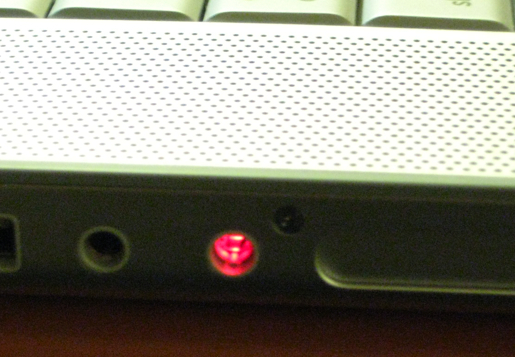
 So it seems I’ve done something to mightily mess up my new MacBook Pro. The other night while in my hotel room at AstriCon, I was using my headset for some Skype calls and then had it in when I started to play some music. Wanting to listen on the built-in speakers, I just pulled the headset out and was then surprised to hear no audio. If I plugged the headset back in, I could hear audio fine. Remove it, no audio. It was about then that I noticed the red light coming out of the side of the MacBook Pro. I didn’t know what this was and tried several other things before finally just forgetting about it.
The next day at AstriCon, I was on the IRC backchannel when someone else in the same physical room as I was figured out who I was and then asked why my MacBook had a red light coming out of the side. In further discussions with others on the channel, it turns out that Apple has done something that on one level is rather cool. They’ve overloaded the functionality of the headphone jack so that it is both a regular 1/8″ audio jack and also a S/P-DIF “digital output”, essentially an optical connection. I’m assuming you’d do this if you had high-end audio equipment and wanted a very pure signal going out to that equipment.
In any event, I seem to be stuck in S/P-DIF mode with no access to the internal speakers. I’m not alone, though, as I found two other mentions (here and here) in the Apple Support forums. But, get this, the answer seems to be:
simply take the headphones and place them in and out the socket until the light goes off.
Yes, indeed – keep plugging and unplugging your headphones until the MacBook clues in to the fact that you don’t have a S/P-DIF cable connected! They were joking, right? Apparently not, because one person said this fixed it for them.
Alas, this did not work for me… I inserted and removed my headphone jack a dozen times with no effect. In fact, I took out another headset and tried it a dozen times, too. Tried different intervals. Thought about trying to say some magic words. (The words I was saying would be unprintable in a family magazine.) Looked around for a goat I could sacrifice while bowing in the general direction of Cupertino but couldn’t find any (and that would be rather messy in a hotel room in any event)…
So there I am… with a MacBook that still looks like something out of the Borg of Star Trek, beaming it’s read light at all around me. I did try mucking around with the MIDI settings, which others seemed to say fixed it, but that, too, seemed to have no effect. I guess I’ll be visiting the Apple dealer from whom I bought this two weeks ago when I get back to VT.
Any MacBook users have any other thoughts? suggestions? magic incantations?
13 responses to “My MacBook seems to be stuck in “Borg emulation mode” (red light) with no access to the built-in speakers”
Try compressed air in the hole. In short though it’s probably needing service
Same thing happened to me after I unplugged by iPod headphones the other day. There seem to be a lot of forum posts about this out there, and everyone seems to agree that you should try to fix it with a toothpick or an unbent paper clip. (There are several tiny switches inside that one little jack, and I’m pretty sure on my MacBook the relevant switch is at 12 o’clock; others say it’s at 6 or 7 o’clock.) I’ve tried the headphone jack in and out trick about 150 times, and I’m ready to risk the toothpick/paper clip. This is kind of ridiculous…
Its actually caused by the laptop being in optical(digital) mode and being stuck there. You can fix the problem with a tooth pick or a paper clip. There is a switch that you can gentle push back in place right inside the headphone jack. BE GENTLE but you can usually find it by fiddling in and out with the toothpick in the inside of the jack. Go in a circular motion until you hit the jack put it only needs a very gentle nudge.
Hope that helps. I found the info and it worked for me. The link is http://forums.macrumors.com/archive/index.php/t-237405.html
Hey guys the answer to the problem…. instead of trying to stick a toothpick or paperclip into the socket and damage the optical lens just insert a set of headphones and make sure the jack goes firmly into the socket. after you push it in the system should reset itself. mine came back instantly. thats what the guy who sold me my macbook told me to do and it worked
I had this same problem with my black macbook. I had the problem for 2 weeks. After awhile it just went away, dont know why. If the paperclip method doesnt work, it will hopefully go away for you too. Good luck!
Hey,
I just posted a post about this topic and I think it should help you. I even used your image (if it’s all right with you).
http://technestreport.com/blog/2009/01/19/tnr-tip-macbook-and-red-light-coming-out-of-headphonemic-jack/
Paper clip did the trick…!!
Create something like a small hook (really small). Look for the second sensor…(pass the first three that receive information from the plug) and rotate it (GENTLY) counter clockwise. You should have itunes running to hear the changes…Once you rotate it slowly you´ll start to listen some sound.
Other thing I read is to plug a digital audio plug and then un-plugg it.
One of two should do the trick
Dan, thanks for this post. I was having the same problem with my MBP (early 2008); your post and the commenters led me to try plugging/unplugging. Because they told me what was going on inside, I was able to free the switch and restore my internal speakers. It was on the second try, but perhaps I was lucky. I did do it slowly and deliberately, and tried rotating the plug the second time. My guess is that simply plugging in and out isn’t going to have any effect unless you happen to hit the microswitch by accident.
Matt, you’re welcome. Thank you to you and all the others for commenting. And yes, I think it’s really an accident if you happen to hit the microswitch to turn it off – just as it was an accident to turn it on.
IT WORKED!!
I’ve had perma-mute/borg mode for the past 4-5 months (I dropped my computer…)… until today when I decided to fiddle with it.. I used the tweezers that come on a swiss army knife, inserted and rotated.. at first heard just a moment… then fiddled some more and finally got it to work again.
MY COMPUTER IS NO LONGER A MUTE!!!
3UD4 !
Thanks 🙂
Tried many jacks , matchsticks and stuff … The thing that worked for me was taking an insulated wire ( same width as a a paper clip ) pushing down on the first contacts in the bottom of the jack plug while rotating the hook counter clockwise and upwards pushing the switch . .
Sweet 🙂
Was thinking I might need a new logic board :s
I had the same problem with my macbook (mid-2007) I took a little tiny dental floss brush, the kind that people who have braces use to clean the braces on their teeth, shut the macbook off, dipped the brush in rubbing alcohol, took excess alcohol off brush with kleenex, then cleaned the inside of the audio jack for about 1 minute. re-dipped the brush in rubbing alcohol, took excess off again, cleaned inside the jack again. I powered up up macbook, went into the audio settings and instead of digital out, I saw Internal speakers!!! picked it and I have sound again!!
hope this helps someone else!
Hi, had the same problem and tried “fixing the problem with a tooth pick or a paper clip. There is a switch that you can gentle push back in place right inside the headphone jack. BE GENTLE but you can usually find it by fiddling in and out with the toothpick in the inside of the jack. Go in a circular motion until you hit the jack put it only needs a very gentle nudge” Just as Conrad said. Worked fine for me! Try it, just be careful not to make the sitch worse. Goodluck! 😉