Do you care any more about zillion different IM services? Do you care about the IM protocol wars that have plagued the usage of IM for the last years?
Odds are that if you are an IM user like me, you probably don’t. Why not? Simple… we’ve unified the IM services on the client side and basically stopped caring about the various services and protocols.
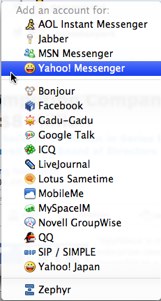 I was reminded of this fact this morning when I received a message saying that an update was available for Adium on my Mac that solved a really annoying disconnection problem with Yahoo!Messenger. (And if you are a Yahoo IM user, you really need to get the 1.3.2b1 beta.)
[NOTE: An equivalent to Adium for Windows or Unix/Linux users is Pidgin.]
Somewhat ironically, there was a discussion going on in a Skype groupchat in which I participate about the various IM protocols and whether anyone really used GTalk, etc. Since I was updating Adium at the time, I took a moment to look at all the different protocols that Adium now supports… as seen in the screenshot on the right side of this post. If I look at my own usage, I use Adium to unify:
- AIM (two accounts)
- MSN/Windows Live Messenger
- Yahoo!Messenger (two accounts)
- Google Talk
- Jabber (two more other than GTalk)
- LiveJournal
- Facebook
- Bonjour
All of those in one client with one directory of users and one window for chats (each on their own tab – and yes, I could have chats in separate windows but I generally choose not to do so).
It’s a beautiful thing.
Now you might say… so why do you have all these services, anyway? Well, I’ve been online since the mid-1980’s and generally my work has always involved keeping up with new technology, so I’ve always dabbled in various services and slowly you develop this accretion of new IM accounts – each that different friends and others use. At one point I did run multiple clients but now just for my own sanity I use just one IM client (actually two, but more on that below).
THE ENTERPRISE ANGLE
The curious aspect that caught my attention was the support Adium has for enterprise IM systems. The list directly includes Lotus Sametime and Novell GroupWise. Jabber support can of course work with internal Jabber servers and SIP/SIMPLE support could work with platforms supporting SIMPLE. Does that include Microsoft OCS? I don’t know, but it would be interesting if it did.
What’s great about all this is that you again have a single IM client that lets you have a single directory for corporate contacts as well as personal contacts. Adium’s interface nicely lets you have a single entry for a person with multiple IM contacts, so you can unify your directory to be able to reach people in different contexts.
THE DOWN SIDE
The down side of a single client is that of course you are in the old “jack of all trades, master of none” scenario. You can receive IM messages from all the various services. You can send IM messages to them. But you can’t necessarily use all the features of the given service. You have one set of status states, which may or may not map to all the status states available on your service (for instance, maybe the IM service has a status “out for dinner”). I haven’t tried it with recent Adium builds, but in the past when I wanted to do an encrypted Jabber session, I had to switch to using Psi. I haven’t tried file transfer using the various services via Adium, so I don’t know how that works. I’m not aware that voice and video works over those services via Adium. Each IM service tries to differentiate with unique features – and they aren’t always supported by all-in-one clients like Adium.
The other down side is “status messages” or “mood messages” that you can set in the IM clients. I have absolutely no idea what my status message in GTalk is, for instance, because I never use it in its native form in a web browser or as a standalone client. I have no idea what my MSN advisory message is for the same reason. Now maybe there’s a way to set that in Adium which I don’t know about… but maybe not. It’s the price you pay for using a unified client.
Now, on the plus side, you never see the ads that IM services wrap their own IM clients in. (Which of course is a down side for the service provider.)
THE MISSING IM SERVICE
If you look at that long list of IM services with which Adium can interconnect, there is one obvious glaring omission:
Skype
When I wrote earlier that I actually have to run two IM clients, it’s because Skype does not allow Adium (or other all-in-one IM clients) to interconnect to its network. So I run two IM clients:
- Skype to IM with Skype contacts
- Adium to IM with contacts on all the other services
Now the reality is that I can’t see technically how a client like Adium would join into the P2P clouds that make up Skype groupchats. Skype’s P2P architecture is very different from the server-based architecture of all the services listed above. So it may be that such an interconnect may not be possible for group chats… and since I use those extensively, I might always have to be running the Skype client natively. Still, there might be a way to interconnect via SIP/SIMPLE… and perhaps that’s something Skype will consider as part of the larger Skype interconnect issues.
SO DO WE CARE ABOUT IM PROTOCOL WARS?
I don’t. I’ve opted out of the battle by using a unified IM client. Sure, I may lose out on some of the unique features of the different services… but I have one directory and one way to send and receive IM messages.
What about you? Do you use a unified IM client like Adium or Pidgin? Or do you run multiple clients? Or do you only use one service?
P.S. Walt Mossberg over at the Wall Street Journal had a post on this issue reviewing some other clients back in August.
Technorati Tags:
im, adium, pidgin, yahoo, googletalk, aim, skype, jabber, collaboration
 Are you interested in how you can service customer requests across all the different communication channels they might use? Do you want to give your customers a choice in the way they interact with you? Rather than requiring them to call in to a customer service phone number, do you want to let them send you a text message? Or an IM? Or use Twitter?
 I gave in today and installed
 In the beginning, there was

 Last week I
 There does, though, seem to be a continuing puzzle around discrepancies regarding the actual limits. Ask any 4 people in a Skype public chat to type “/info” on the command line and relay the result… and you’ll probably get four very different answers. I just did that in one public chat (Update: it was the “